Com-Free AI Flow Studios
Studio No. 08 · Real EstateFree AI video studio for Google Flow

The listing, presented

Global Property Showcase Studio

Upload the rooms, pick a style and a story, and turn a listing into a cinematic home tour.

Stage a hero image for every space, set each shot's End Frame with a perspective preset, then render frame-to-frame clips with natural ambient sound — all inside Google Flow, from your own room photos.

  1. 1. Get your key
  2. 2. Copy key or prompt
  3. 3. Open Google Flow
Plate I Dusk pool villa tour Sample clip · 24 s · 9:16 · loads on play
Free vs. Pass

Rates & terms

A free key opens the studio for 60 minutes — get a new one here whenever it runs out. A pass skips the renewals for days at a time.

Free key and pass plans
PlanLengthPricePer dayNote and action
Free 60 minutes per key $0 — Get a new key any time on this page
Trial 2 days $2 $1.00 Buy for $2
Standard 15 days $10 $0.67 Buy for $10
Monthly Best value 30 days $15 $0.50 Buy for $15
  • One-time payment.
  • Prices in USD. Your card issuer may convert to your local currency.
  • Card, Apple Pay & Google Pay via Stripe.
  • Your pass starts when payment completes and the key is shown instantly.
  • One pass works across all 9 studios.
The process, in six plates

How it works

The studio runs in four tabs — 1. Design & Style, 2. Spaces, 3. Storyboard, 4. Video Render. These are the real screens, in order.

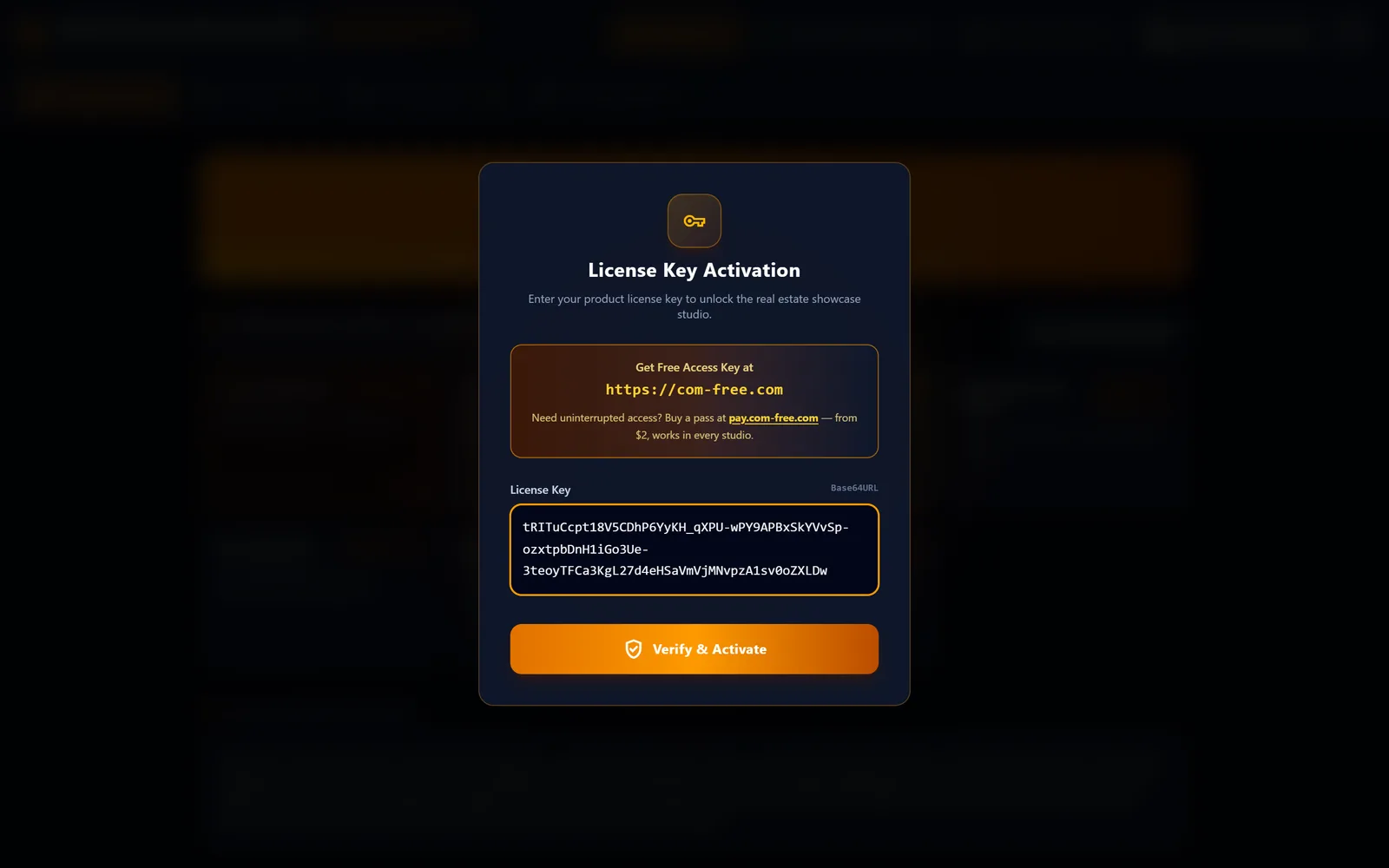
  1. The studio's License Key Activation dialog with a pasted access key and the Verify & Activate button.

    Paste your key

    Get a free key here → Open in Google Flow → paste the key into the Access Key dialog

    In the tool: Access Key dialog (Verify & Activate)
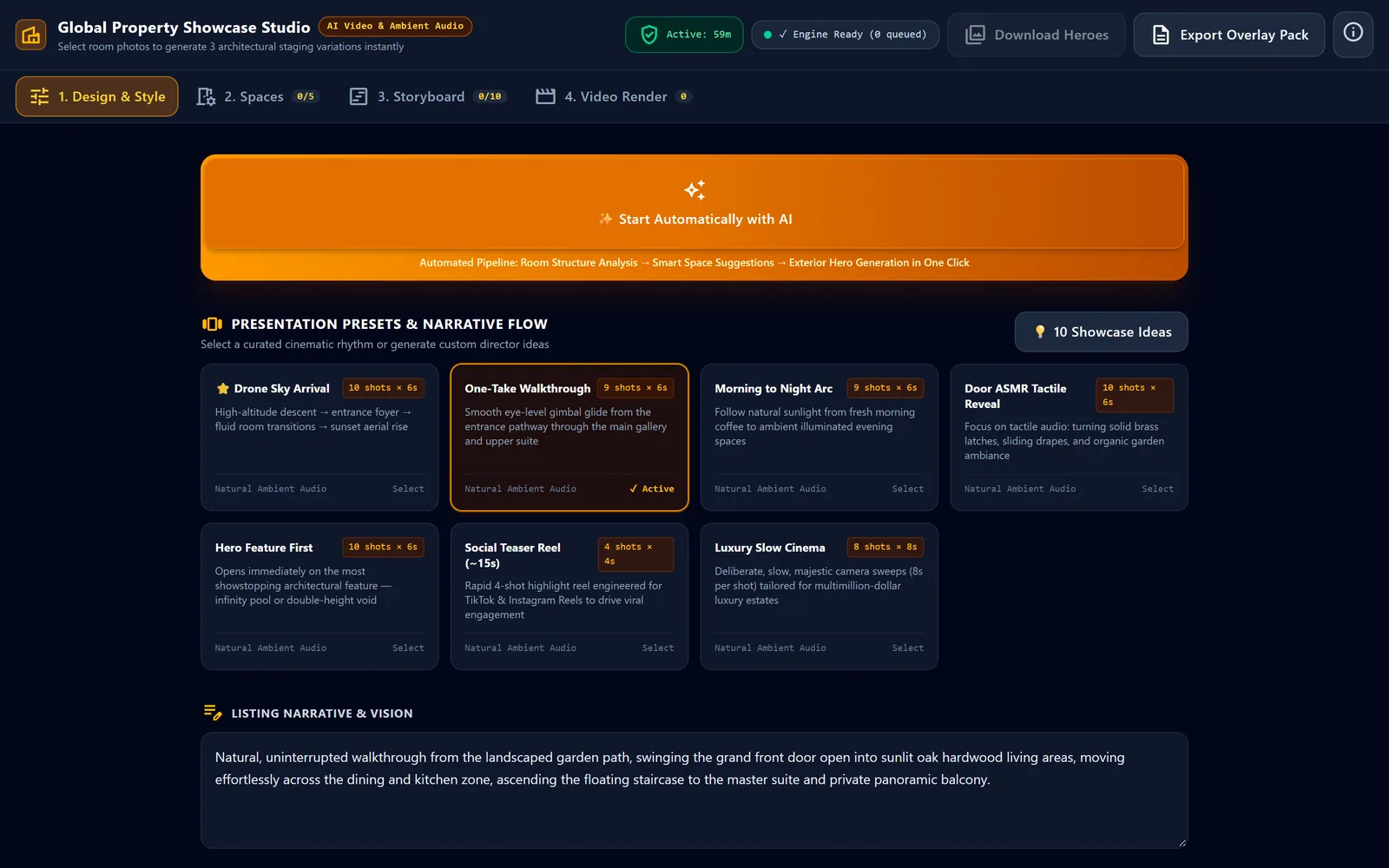
  2. Design & Style tab showing seven presentation preset cards with One-Take Walkthrough marked active.

    Pick a presentation preset

    Pick a presentation preset like One-Take Walkthrough in the Design & Style tab

    In the tool: 1. Design & Style
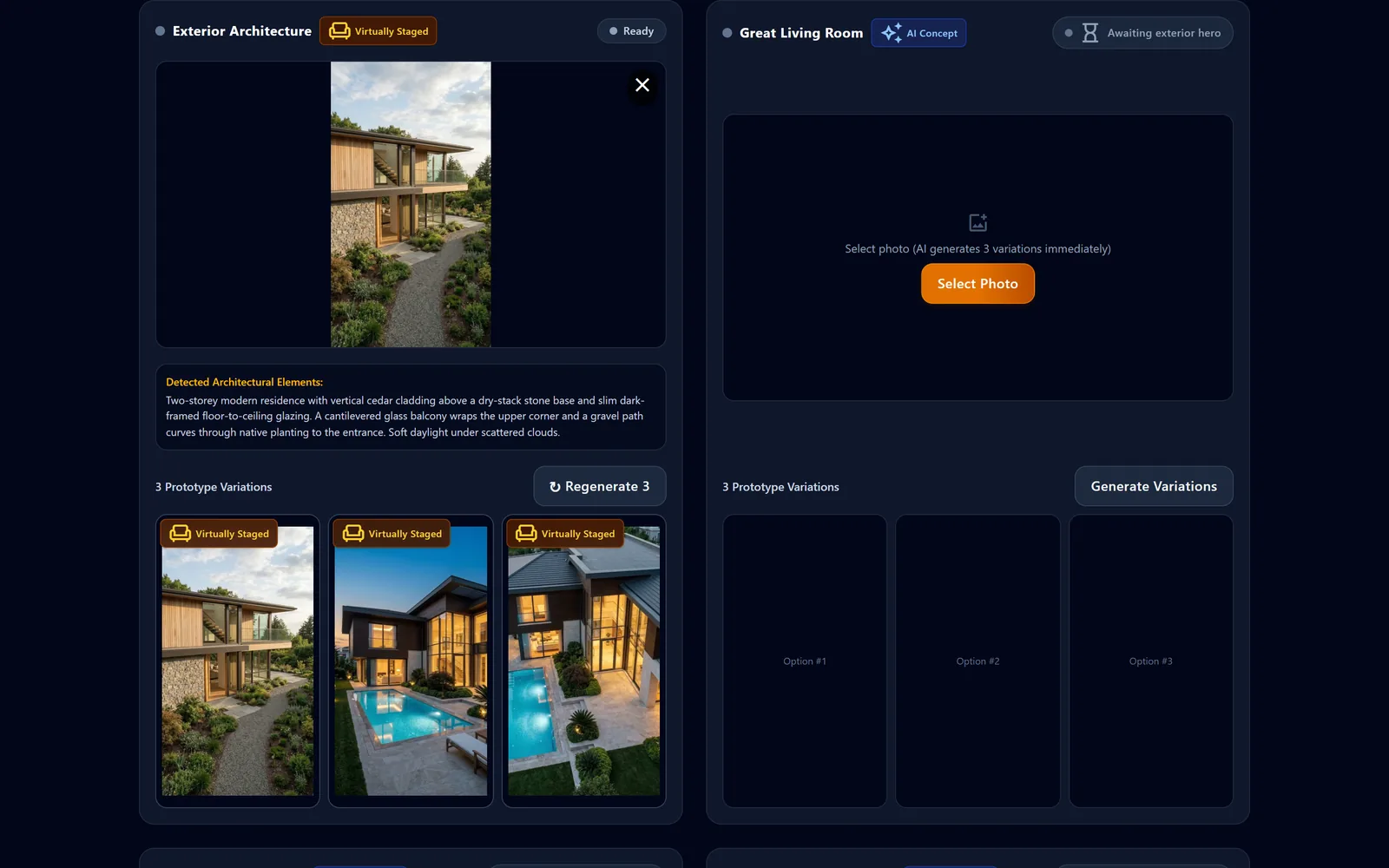
  3. Exterior Architecture card with a cedar house photo, detected architectural elements and three staged variations.

    Stage the Exterior photo

    Select Photo on the Exterior card: AI analyzes it and stages 3 variations

    In the tool: Select Photo
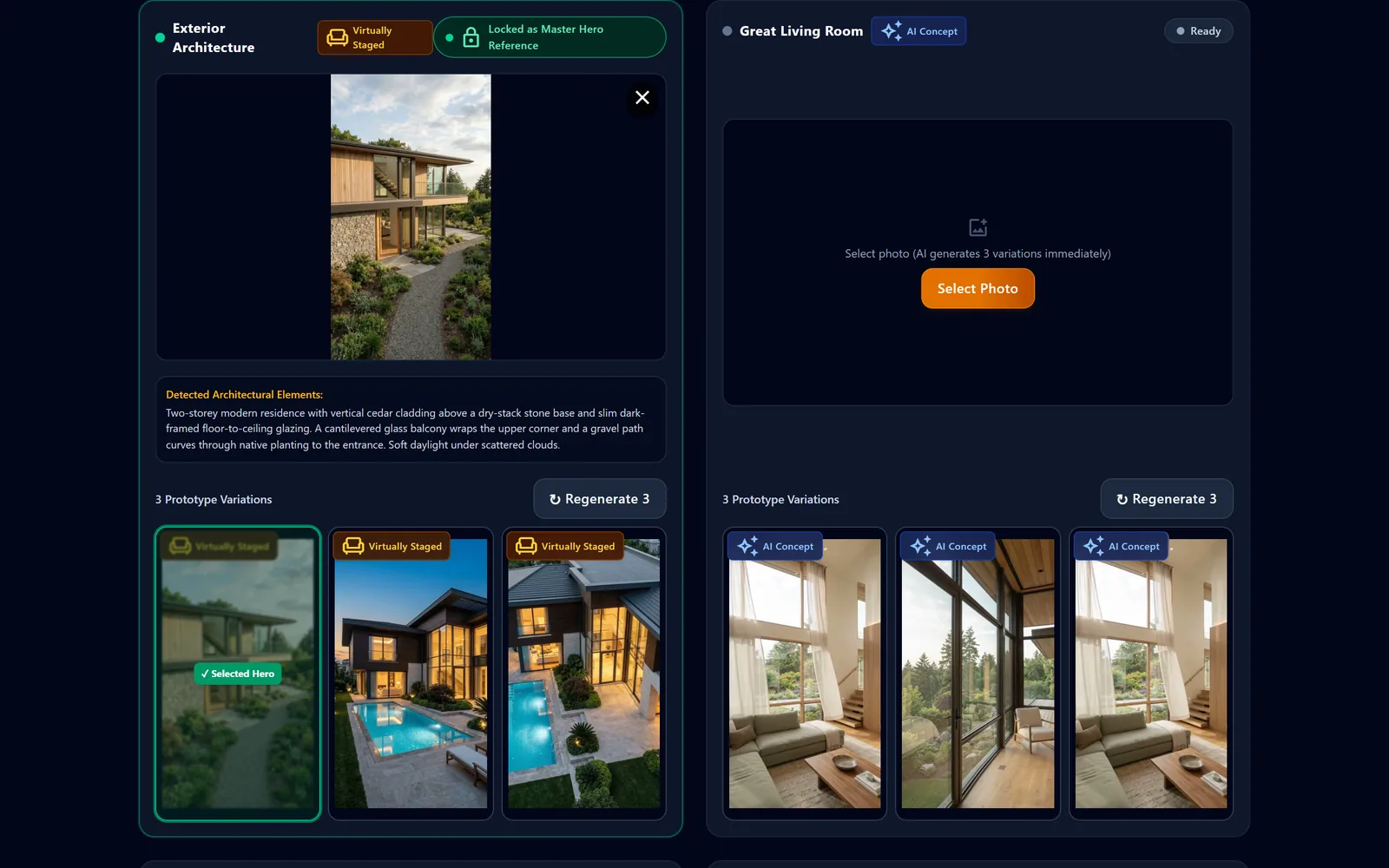
  4. Spaces tab with the Exterior locked as master hero reference and the Great Living Room staged in three matching variations.

    Lock the Exterior hero

    Click a variation to lock the Exterior hero; every room is then staged to match

    In the tool: 2. Spaces
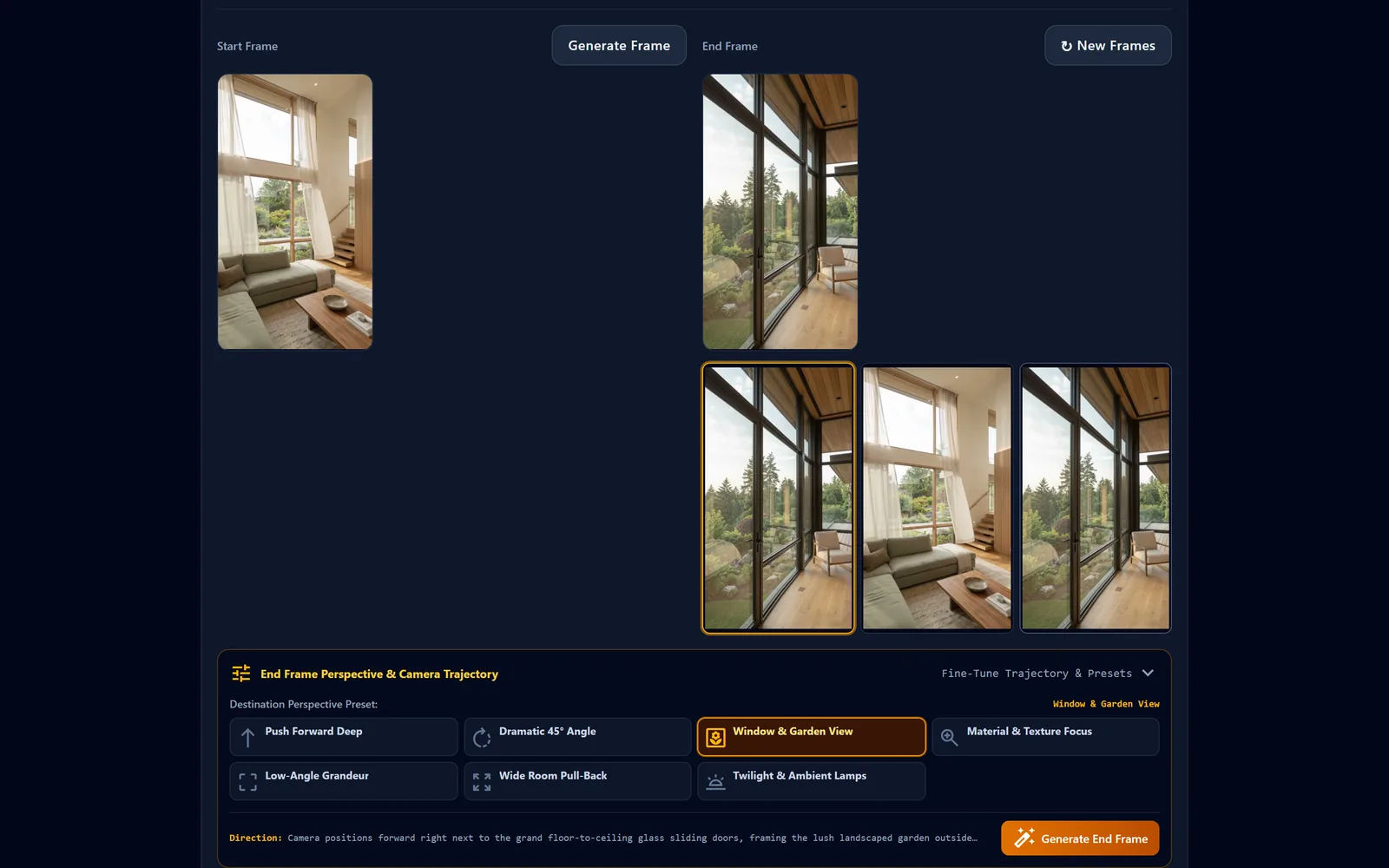
  5. Storyboard shot with start and end frames and the seven End Frame perspective presets, Window & Garden View selected.

    Set the End Frame perspective

    Choose an End Frame perspective preset in Storyboard, then Generate End Frame

    In the tool: Generate End Frame
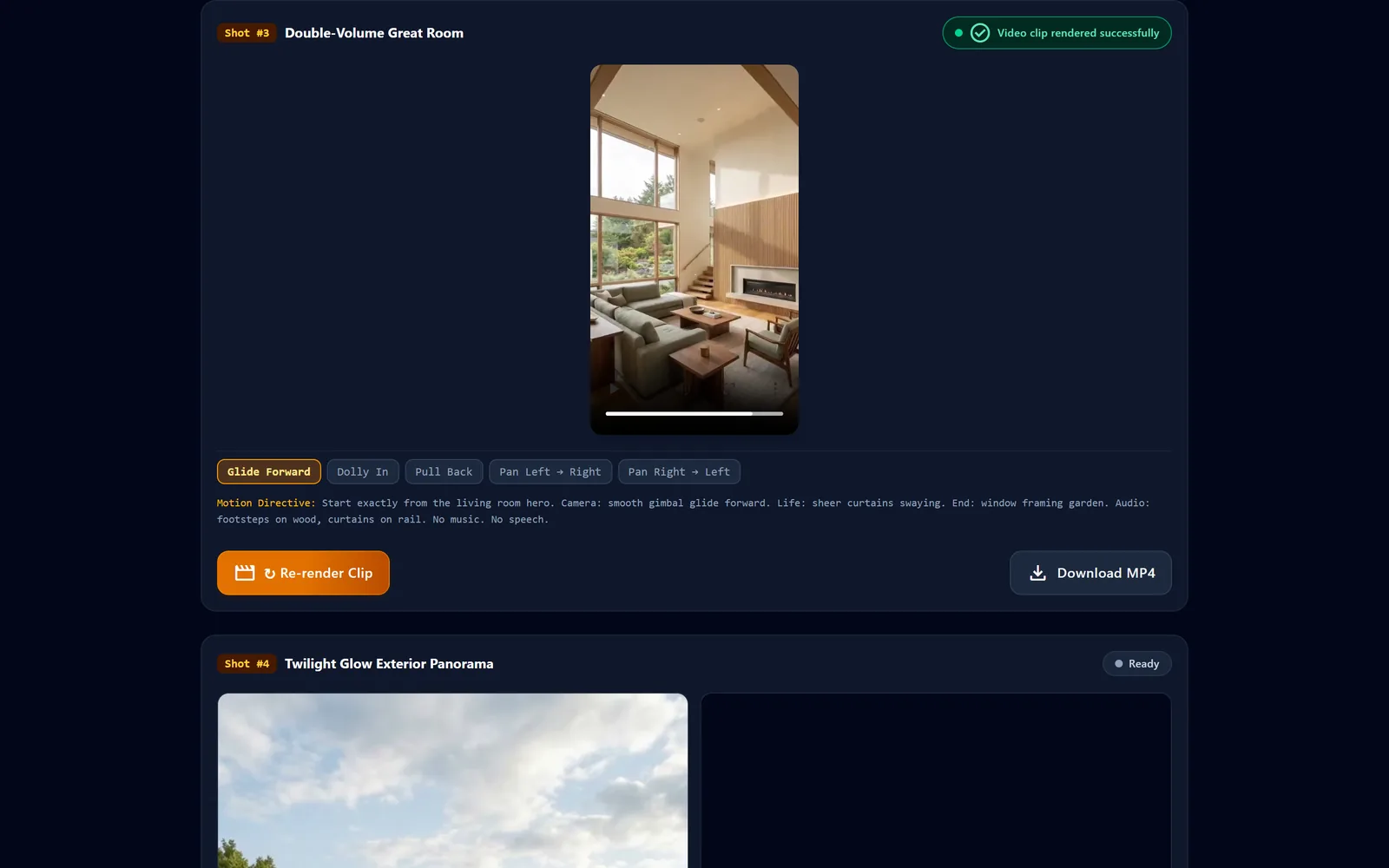
  6. Video Render tab showing a rendered vertical clip of a double-volume great room with camera move chips and its motion directive.

    Render the clip

    Render Video Clip in the Video Render tab animates the start frame to the end frame

    In the tool: Render Video Clip
Interface preview — sample outputs from this studio.Walkthrough · 16:9 · no voice-over
The portfolio

Two sample films

Vertical 9:16 tours made with this studio: aerial arrival, staged rooms and natural ambient sound — no music, no on-screen text. Each film loads only when you press play.

Plate I

Dusk pool villa tour

Vertical sample clip of a dark-timber two-storey villa at dusk: a high aerial view over the lit pool and glazed facade, the twilight exterior, a double-height living room with sheer curtains, a primary bedroom with warm cove lighting, and a closing view of the house and pool at blue hour.

24 s9:16 · 720×128020.8 MB
Plate II

Cedar-and-stone house walkthrough

Vertical sample clip of a cedar-clad house on a dry-stack stone base in daylight: a glide along the gravel garden path, a double-height living room with a fireplace and sheer curtains, a bedroom under a timber ceiling, and a floor-to-ceiling glass corner looking out over the treetops.

18 s9:16 · 720×128018.4 MB
End Frame perspective presets · 7

The perspectives

In the Storyboard tab every shot has a Start Frame and an End Frame. Pick one of these seven destination perspectives, press Generate End Frame, and the clip later travels from start to end. The direction below is the exact instruction the tool sends.

Start frameEnd framePlan view

Push Forward Deep

Significant camera forward translation of 3 meters into the scene

Camera moves deeply 2.5 - 3 meters into the interior, revealing spatial depth and inner architectural highlights.

Direction sent to the tool

Camera moves deeply 3 meters forward into the room interior, framing deeper spatial depth and inner architectural highlights while staying in the same architectural space.

Prompt library · 14 presets

The prompt library

Every preset from the studio, word for word: 7 presentation presets that set the story of the tour and 7 End Frame perspectives (above). Plus the per-shot Motion instruction to remix and the 10 Showcase Ideas meta-prompt.

Presentation presets

Presentation presets · Design & Style tab

Each preset sets shot count, shot length, camera language and the listing story. The text is the story the tool writes into Listing Narrative & Vision.

  1. Drone Sky Arrival

    10 shots × 6 s60 s total

    High-altitude descent → entrance foyer → fluid room transitions → sunset aerial rise

    Showcase a contemporary two-storey luxury residence in a quiet private enclave. 280 sq.m (3,000 sq.ft) of refined living on a private landscaped lot. 4 bedrooms, 4 bathrooms. Opens with an aerial drone descending from open skies towards the manicured courtyard, gliding past the custom entrance doors into a double-height living room with sheer drapery and garden vistas. Seamless tour through the open-plan dining suite, marble chef island, primary suite, and spa bath. Concludes over the private pool terrace as the camera rises into warm golden twilight.

  2. One-Take Walkthrough

    9 shots × 6 s54 s total

    Smooth eye-level gimbal glide from the entrance pathway through the main gallery and upper suite

    Natural, uninterrupted walkthrough from the landscaped garden path, swinging the grand front door open into sunlit oak hardwood living areas, moving effortlessly across the dining and kitchen zone, ascending the floating staircase to the master suite and private panoramic balcony.

  3. Morning to Night Arc

    9 shots × 6 s54 s total

    Follow natural sunlight from fresh morning coffee to ambient illuminated evening spaces

    Experience a full day in this private architectural retreat: soft morning rays filtering through linen bedroom drapes, sparkling turquoise reflections across the pool deck in the afternoon, warm sunset dining illumination, and soft architectural perimeter LEDs glowing at nightfall.

  4. Door ASMR Tactile Reveal

    10 shots × 6 s60 s total

    Focus on tactile audio: turning solid brass latches, sliding drapes, and organic garden ambiance

    A sensory presentation highlighting tactile textures: releasing heavy timber door latches, sliding linen curtains aside to let garden breezes flow, acoustic clinks of ceramic cups, and rich matte flooring guiding the eye into harmonious Japandi interiors.

  5. Hero Feature First

    10 shots × 6 s60 s total

    Opens immediately on the most showstopping architectural feature — infinity pool or double-height void

    Instant visual impact: leads off with the pristine infinity swimming pool reflecting golden skies, driving forward into a towering double-volume great room, and finishing with an expansive sunset terrace panorama.

  6. Social Teaser Reel (~15s)

    4 shots × 4 s16 s total

    Rapid 4-shot highlight reel engineered for TikTok & Instagram Reels to drive viral engagement

    High-energy 15-second vertical showcase: 4 pinnacle scenes covering the pool, great room, primary suite, and dusk exterior glow, with clean lower third composition reserved for listing agent contact info.

  7. Luxury Slow Cinema

    8 shots × 8 s64 s total

    Deliberate, slow, majestic camera sweeps (8s per shot) tailored for multimillion-dollar luxury estates

    High-end architectural cinema capturing imported bookmatched marble, patinated bronze fixtures, lush landscaped grounds, and generous open volume bathed in luminous golden sunlight.

Master template

Motion instruction remix

The per-shot video prompt the studio uses in Video Render. Choose the camera move, style, speed, ending and sounds from the tool's own options; type the path, life motion and house style line.

Sounds (multi) {vb[]}

Your motion instruction

Start exactly from the start frame. Camera: {va}, {t}, {vc}. Path: {camera path}. Life: {life motion or "nothing else moves"}. End: exactly matches the end frame. Same room, furniture, materials and light throughout; parts that come into view continue the same style ({STYLE_LINE}). Ending: {vd}. Audio: natural ambient sounds only: {vb[]}. No music.

Highlighted words are your chosen values. A dashed red value means the slot is still empty.

Original template Start exactly from the start frame. Camera: {va}, {t}, {vc}. Path: {camera path}. Life: {life motion or "nothing else moves"}. End: exactly matches the end frame. Same room, furniture, materials and light throughout; parts that come into view continue the same style ({STYLE_LINE}). Ending: {vd}. Audio: natural ambient sounds only: {vb[]}. No music.
Meta-prompt

10 Showcase Ideas

The prompt behind the "10 Showcase Ideas" button in the Design & Style tab. Copy it as-is, or fill the three variables to use it with any chat AI.

Act as an executive creative director for cinematic luxury property reels.
Property type: {propertyType}, Spaces: {spacesList}.
Current story: {story}.
Generate 10 distinct presentation concepts: each with one hook opening, one seamless spatial journey through the home, and one memorable closing scene; natural ambient ASMR audio, no on-screen text.
Reply with JSON array of 10 items:
[{"title": "Aerial Sky Arrival Estate", "line": "Sky descent -> double-height great room -> sunset poolside hold", "story": "Full story narrative...", "codes": {"a": "a1", "c": "c1", "q": "q1", "r": "r1", "t": "t1", "x": 10, "y": 6}}]

The tool sends it with the system instruction "Respond only with pure JSON array, without markdown backticks." In the studio, Use Concept applies the returned codes and story.