Prices in USD. Your card issuer may convert to your local currency.
Card, Apple Pay & Google Pay via Stripe.
Your pass starts when payment completes and the key is shown instantly.
One pass works across all 9 studios.
03
Field notes
Six steps, captured from the real tool. Button names are exactly what you will click.
How it works
From an empty key field to rendered clips: the studio walks you through Story Setup, Scene Script, Storyboard and Video Render.
Fig. 1
Paste your key
Get a free key here → Open in Google Flow → paste the key into the Access Key dialog
In the tool: Access Key dialog
Fig. 2
Find a viral idea
Open 10 Viral Concepts in Story Setup and click Use Concept on an idea
In the tool: 10 Viral Concepts
Fig. 3
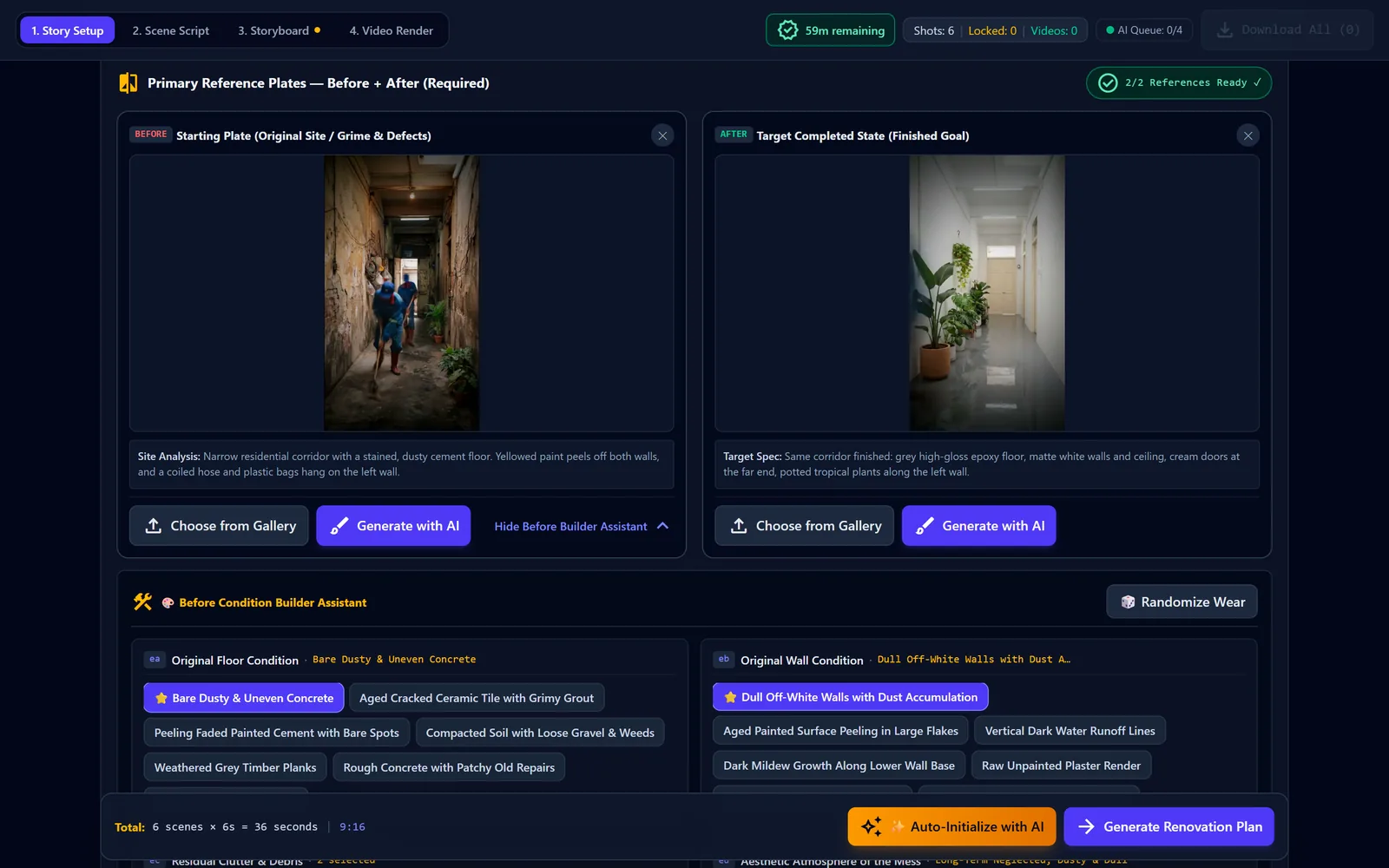
Make Before + After plates
Generate with AI draws the Before and After plates, then auto-analyzes them
In the tool: Generate with AI
Fig. 4
Plan the scene script
Auto-Initialize with AI checks both plates and writes the Scene Script
In the tool: Auto-Initialize with AI
Fig. 5
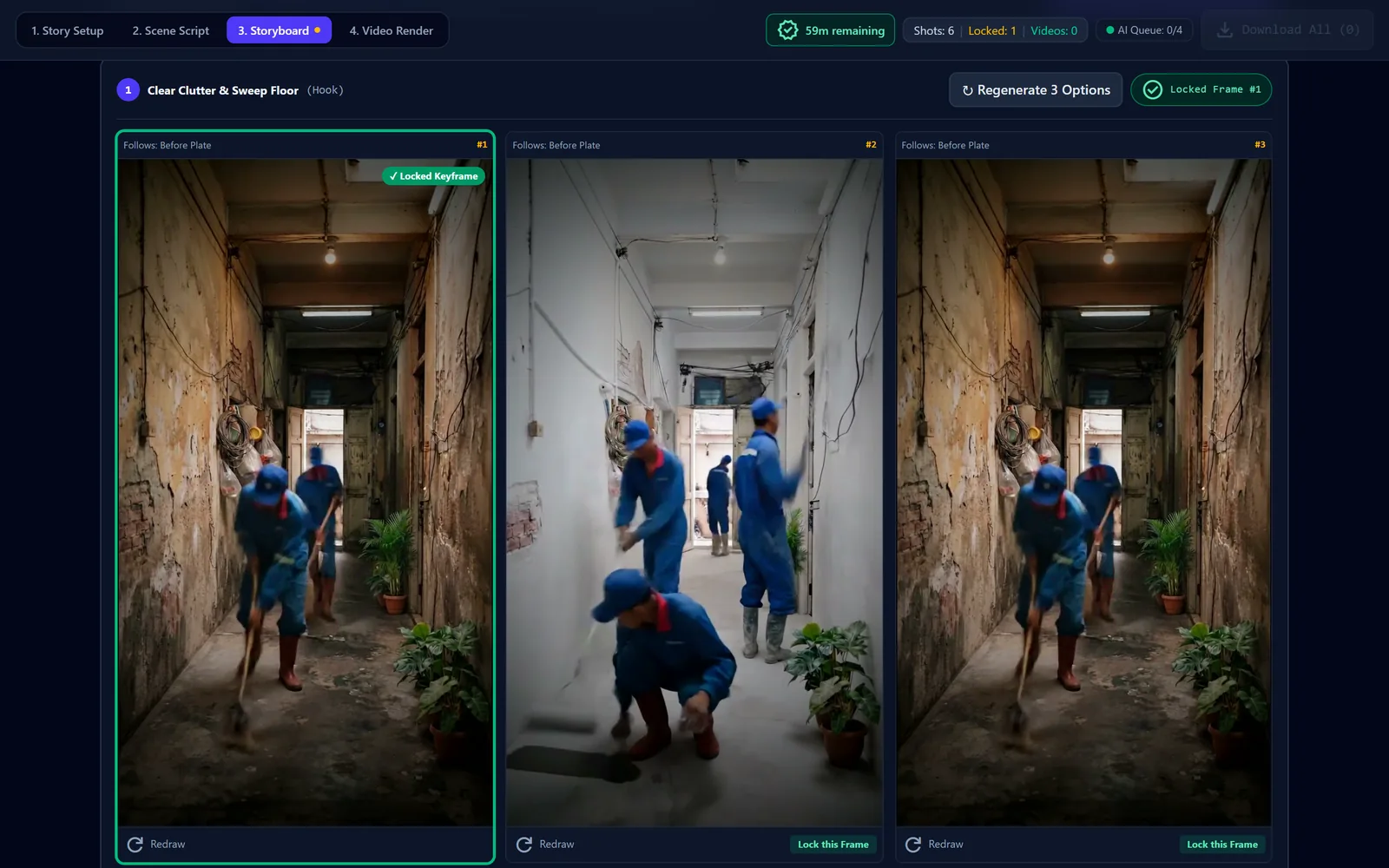
Pick storyboard keyframes
Click Generate Storyboard for 3 keyframe options, then Lock this Frame
In the tool: Generate Storyboard
Fig. 6
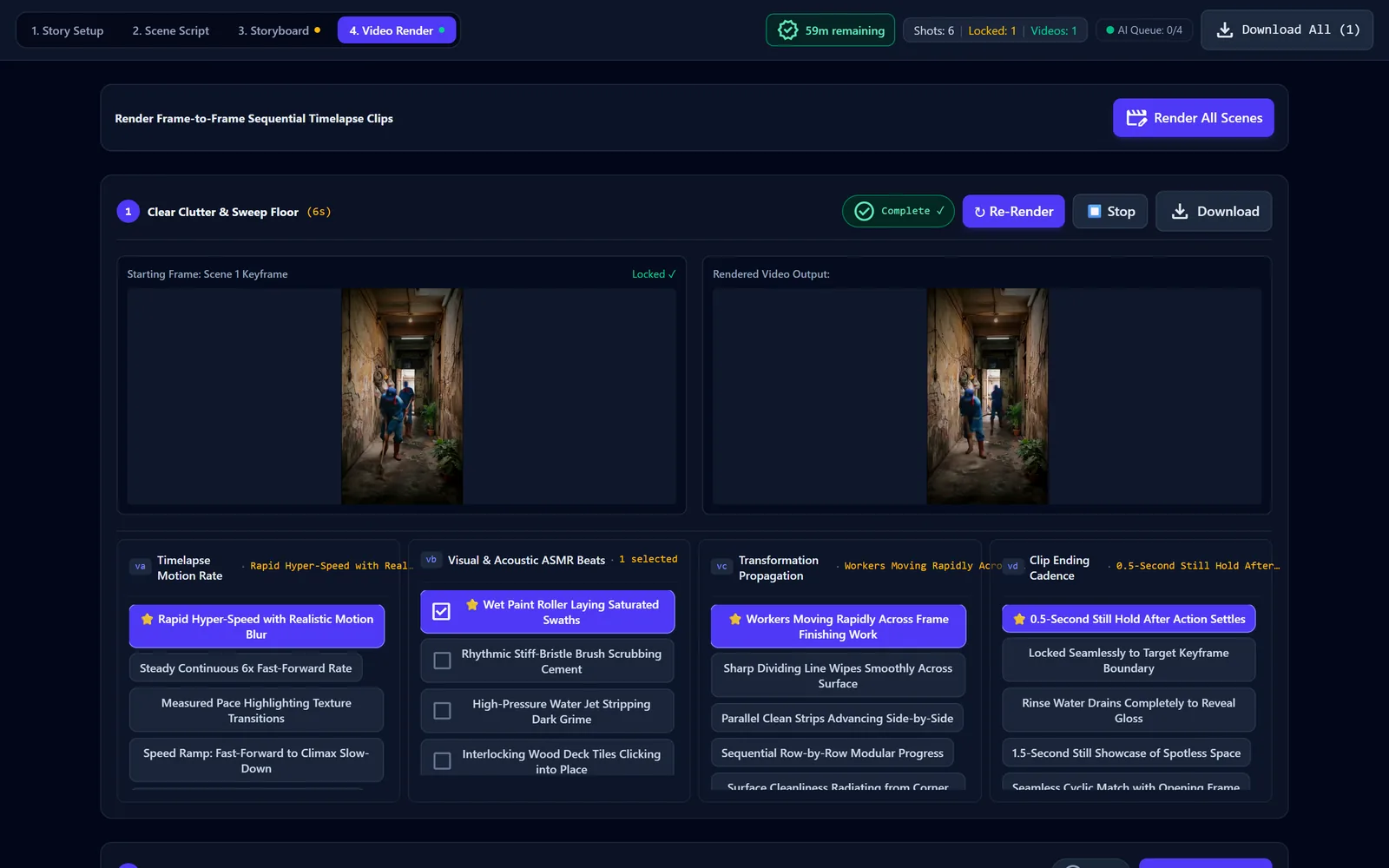
Render the clips
Render Video Clip turns each locked keyframe into a timelapse clip
In the tool: Render Video Clip
Interface preview — sample outputs from this studio.
04
The clips
Three sample timelapses. Jump between the chapters, then copy the preset that matches what you see.
Three jobs, one tripod each
Each clip is a vertical 9:16 timelapse from a single fixed camera. The chapters mark the real moments in each clip: Before, the work stages and After.
21 Oct 2026 · 22:33
Clip 1 of 3
The corridor · 0:30 · 9:16 · 38.2 MB. Loads only when you press play.
Corridor: peeling walls to glossy grey floor
Fixed-camera timelapse down a narrow corridor. A crew in blue workwear sweeps the stained floor, paints the yellowed walls white and coats the floor in glossy grey; the clip ends on white walls, a reflective floor and potted plants along the left wall.
Chapters — click to jump; the clip loads and plays from there
Related preset · Glossy epoxy corridor
Renovate an elongated side corridor beside a residential townhouse, roughly 1.5 x 8 meters, framed from a locked tripod in the corner. Before: weathered cement slab with peeling paint, accumulated dust, grime stains, and old storage clutter along the wall. Two workers clear debris, scrub surfaces clean, scrape peeling paint, patch cement cracks, roll bonding primer, and coat the floor with a seamless high-gloss grey epoxy finish. After: polished reflective floor reflecting natural light, crisp white perimeter walls, and clean potted green plants.
6 × 6 = 36 s
Epoxy floor coating
Narrow side corridor
21 Oct 2026 · 23:18
Clip 2 of 3
The kitchen · 0:36 · 9:16 · 46.7 MB. Loads only when you press play.
Mud-covered kitchen to clean white tiles
Fixed-camera timelapse from a kitchen doorway. Workers haul out muddy pots and buckets, hose and scrub the floor, walls and counter, and the clip ends on white floor tiles, a clean counter and pots arranged on open shelves.
Chapters — click to jump; the clip loads and plays from there
Related preset · Flood kitchen rescue
Restore a residential back utility kitchen following seasonal water damage, filmed from the doorway entrance. Before: dried water lines, stubborn residue, and scattered clutter. Two renovation specialists haul away damaged boxes, pressure-wash tiled surfaces, scrub grout lines with brass-bristle brushes, scrape stubborn residue, and polish stainless steel fixtures. After: pristine gleaming white ceramic tile floor, sanitized countertops, and a clean, airy workspace.
6 × 6 = 36 s
Post-flood deep clean
Old kitchen (indoor)
22 Oct 2026 · 00:19
Clip 3 of 3
The side yard · 0:30 · 9:16 · 39.4 MB. Loads only when you press play.
Overgrown side yard to gravel path
Fixed-camera timelapse of a narrow walled yard. Workers bag weeds and dry leaves, dig and level the soil, lay weed-barrier fabric and spread white gravel around stepping stones; the clip ends with potted banana plants and ferns along the walls.
Chapters — click to jump; the clip loads and plays from there
Related preset · Overgrown yard clear
Reclaim an overgrown suburban backyard, framed from an elevated locked tripod. Before: waist-high weeds, tangled vines, decaying leaves, and cracked masonry chunks. Two landscapers rake and clear the bramble into waste bags, dig out stubborn roots, grade the soil, lay heavy-duty landscape weed barrier fabric, and spread clean white decorative gravel with flagstone pavers. After: sleek minimalist courtyard patio with decorative planters.
5 × 6 = 30 s
Overgrown yard clearing
Backyard
05
Inside the studio
Who it is for, and what each tab actually does.
What the builder does
Made for short-form video creators, renovation and cleaning channels, and home-improvement marketers who want satisfying before-and-after renovation clips from one fixed camera angle.
“3 keyframe options per scene, each an edit of the previous locked frame.”
Storyboard tab
Auto-Initialize with AI: one click prepares the Before and After plates, analyzes both, checks the camera angle, plans the scenes and opens the Scene Script tab
6 one-click presets (epoxy corridor, deck tile balcony, flood kitchen, overgrown yard, pressure-washed walkway, exterior wall repaint) that set every option and the story text
10 Viral Concepts: AI suggests ten renovation ideas; Use Concept fills the story and options
Before and After reference plates: Choose from Gallery or Generate with AI, with automatic site analysis and a target layout map
Before Condition Builder Assistant chips for floor, walls, leftover clutter, mood, mess level and light
Click-only option chips for story angle, job, space, size, condition, finishes, palette, crew, camera, lens, hook, climax, reveal, motion and things to avoid
Scene Script: layout map, preserved architectural details and editable scene cards with progress %, ASMR detail, shot length and motion prompt
Storyboard: 3 keyframe options per scene, each an edit of the previous locked frame; Lock this Frame to continue
Video Render: frame-to-frame timelapse clips per scene with speed, ASMR beat, change-travel and ending chips, plus append-only extension scenes
Generation queue with up to 4 parallel jobs and Download All for finished clips
06
The prompts
Everything the studio is built on: the master template, all six presets and the idea prompt. Copy any of it with one click.
Prompt library
You don't have to write prompts yourself. Pick options, copy the result, and paste it into the studio in Google Flow.
Change any option and the full prompt rewrites itself on the right. Values in highlight are what you picked; click one to jump to its control.
Load a preset:
Your customized prompt
Default settings
Saved in this browser
The six presets exact text
One-click presets (Story tab): each one sets every option and loads this story text in the tool.
No. 1
Glossy epoxy corridor
6 × 6 = 36 s
Epoxy floor coating
Narrow side corridor
Renovate an elongated side corridor beside a residential townhouse, roughly 1.5 x 8 meters, framed from a locked tripod in the corner. Before: weathered cement slab with peeling paint, accumulated dust, grime stains, and old storage clutter along the wall. Two workers clear debris, scrub surfaces clean, scrape peeling paint, patch cement cracks, roll bonding primer, and coat the floor with a seamless high-gloss grey epoxy finish. After: polished reflective floor reflecting natural light, crisp white perimeter walls, and clean potted green plants.
No. 2
Deck tile balcony
6 × 6 = 36 s
Interlocking deck tiles
Small balcony
Upgrade an upper-floor townhouse balcony, roughly 2 x 4 meters, captured from a steady locked tripod angle. Before: bare stained concrete with weathered patches and hairline surface cracks. The crew deep-cleans the concrete floor with brushes and water, lets it dry, and installs modular interlocking teak-wood deck tiles row by row with precision. After: beautiful warm natural wood terrace floor, fresh neutral walls, and contemporary potted tropical foliage.
No. 3
Flood kitchen rescue
6 × 6 = 36 s
Post-flood deep clean
Old kitchen (indoor)
Restore a residential back utility kitchen following seasonal water damage, filmed from the doorway entrance. Before: dried water lines, stubborn residue, and scattered clutter. Two renovation specialists haul away damaged boxes, pressure-wash tiled surfaces, scrub grout lines with brass-bristle brushes, scrape stubborn residue, and polish stainless steel fixtures. After: pristine gleaming white ceramic tile floor, sanitized countertops, and a clean, airy workspace.
No. 4
Overgrown yard clear
5 × 6 = 30 s
Overgrown yard clearing
Backyard
Reclaim an overgrown suburban backyard, framed from an elevated locked tripod. Before: waist-high weeds, tangled vines, decaying leaves, and cracked masonry chunks. Two landscapers rake and clear the bramble into waste bags, dig out stubborn roots, grade the soil, lay heavy-duty landscape weed barrier fabric, and spread clean white decorative gravel with flagstone pavers. After: sleek minimalist courtyard patio with decorative planters.
No. 5
Pressure wash walkway
4 × 6 = 24 s
Pressure washing
Concrete walkway
Deep clean a 12-meter exterior concrete garden path with an industrial pressure washer from a locked one-point perspective. Before: thick dark algae streaks, slippery organic biofilm, and grime accumulation. A technician in rubber work boots methodically sweeps a high-pressure rotary water wand, stripping black grime into crisp clean tracks and rinsing residue into drainage outlets. After: bright light-grey concrete surface, completely clean and slip-resistant.
No. 6
Front wall repaint
6 × 6 = 36 s
Exterior wall repaint
Front facade + porch
Repaint a single-story residential entryway facade and veranda, captured in a direct eye-level perspective. Before: faded peeling turquoise paint, dark water stains, and cracked plaster edges. The painter uses a steel scraper to remove loose flakes, applies spackling paste to fill cracks, rolls an all-weather bonding primer, and finishes with crisp off-white exterior paint. After: pristine smooth facade with crisp architectural trim and hanging decorative fern baskets.
Meta-prompt · 10 viral ideas for any chat AI
Act as a viral timelapse idea generator for low-cost Thai house renovation. Generate 10 different ideas: fixed tripod, satisfying transformation, Before {dirty state} -> Action {fast work by Thai workers} -> After {clean beautiful result}, in Thailand, no camera movement. Mix: epoxy floor, deck tiles, kitchen cleaning, pressure washing, garden clean-up, wall repaint, re-tiling, mold removal, junk clear-out, artificial grass. No two ideas share space and job. Use option codes from: {codes and labels a–v}.
Reply: [{"title": "max 5 words", "line": "Before -> Action -> After, max 25 words", "story": "60–90 words, includes in Thailand", "codes": {"a": "a1", …}}]
Ask a chat AI for ten fresh renovation ideas in this format. In the studio, the 10 Viral Concepts button sends a shorter version of this prompt and fills the story with Use Concept.
Com-Free AI Flow Studios
More studios
Nine free AI video studios for Google Flow. One pass works across all of them.